
HJ1 智慧眼鏡 B2B Demo 設計 HJ1 AI Smart Glasses B2B Demo Design
在無完整 OS 的硬體環境下,與韌體工程師協作,打造以眼動追蹤為核心的 1.5 分鐘 B2B 展示流程,支援 CES 2026 等重要商業展示。 Working with firmware engineers in a no-OS hardware environment, designed a 1.5-minute eye-tracking-centric B2B demo flow supporting CES 2026 and other major commercial presentations.
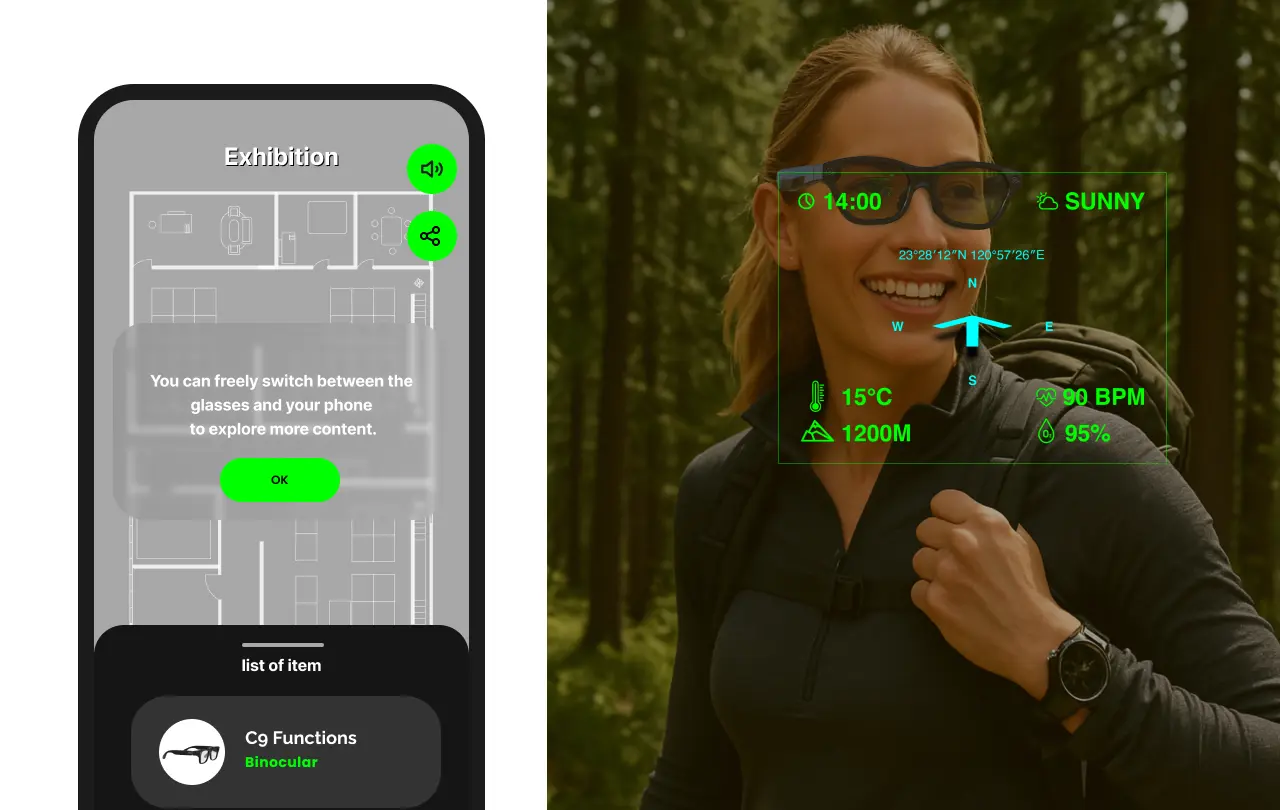
Multi-modal AR
Design Context
HJ1 是 Jorjin 自主開發的 AI 智慧眼鏡,搭載眼動追蹤模組。在我加入前,公司展示方式是「眼鏡插手機」,以手機軟體為主,展示眼鏡解析度,而非眼鏡本身的互動能力。
HJ1 is Jorjin's in-house AI smart glasses with an eye-tracking module. Before I joined, the demo approach was "glasses connected to phone" — showcasing the phone software and display resolution, not the glasses' own interaction capabilities.
加入後,主導設計 HJ1 一體機的完整 B2B 展示體驗。由於 HJ1 當時尚無完整作業系統,UI 需直接提供素材與詳細互動規格給韌體工程師實作,並共同調整眼動 UX 參數(觸發時程、觸發範圍、數據平滑處理與異端值剔除)。
After joining, I led the complete B2B demo experience design for the HJ1 standalone device. With no full OS at the time, UI assets and detailed interaction specs had to be delivered directly to firmware engineers for implementation — and we jointly tuned the eye tracking UX parameters (trigger timing, trigger zone, data smoothing, and outlier rejection).
Challenges
- 無 OS 支援:設計必須完全依賴韌體實作,設計規格需高度精確,無法依賴現有 UI 框架。
- 眼動偵測成功率不確定:偵測結果取決於使用者臉部條件(眼距、鼻樑高度、鼻墊尺寸),無法保證每位客戶都能順利校正。
- 展示時間壓力:舊版 demo 約 5 分鐘,且 touchpad 與眼動混用,互動形式不一致,難以讓商業客戶聚焦在核心優勢。
- No OS support: Designs had to rely entirely on firmware implementation with highly precise specs — no UI frameworks available.
- Uncertain eye tracking success rate: Detection depends on each user's facial geometry (IPD, nose bridge height, nose pad size) — calibration couldn't be guaranteed for every visitor.
- Demo time pressure: The original demo was ~5 minutes, mixing touchpad and eye tracking, making it hard for B2B clients to focus on the core advantage.
What I Did
- 設計 HJ1 完整展示體驗,將時長從 5 分鐘壓縮至 1.5 分鐘
- 規劃自動串接機制,確保眼動偵測失敗時流程仍能繼續
- 提供 UI 素材與互動規格,與韌體工程師共同測試調整眼動參數
- 依展示場域(CES、Amazon、運科中心)調整情境內容
- 設計運科中心版本「眼鏡 → 大螢幕」雙屏互動延伸
- Designed the complete HJ1 demo experience, compressing runtime from 5 minutes to 1.5 minutes
- Planned auto-advance mechanisms to keep the flow moving even when eye tracking failed to trigger
- Delivered UI assets and interaction specs; jointly tuned eye tracking parameters with firmware engineers
- Adapted content for each venue: CES, Amazon, Sports Technology Center
- Designed the Sports Technology Center version's "glasses → large screen" dual-display extension
Design Process
核心設計問題:如何在時間有限、眼動偵測成功率不穩定的情況下,讓每位 B2B 客戶都能完整體驗眼動追蹤的互動優勢?
Core design question: How do we ensure every B2B visitor completes a full eye-tracking interaction experience, given limited time and unstable detection success rates?
4 個階段,1.5 分鐘——讓每位客戶都能走完完整眼動體驗
4 stages, 1.5 minutes — ensuring every visitor completes the full eye-tracking experience
將舊版 5 分鐘、touchpad / 眼動混用的散亂流程,重新設計為以眼動追蹤為唯一核心模態的串接體驗。
Redesigned the original fragmented 5-minute flow (mixing touchpad and eye tracking) into a sequential experience with eye tracking as the sole interaction modality.
- ① 確認畫面 — 確認使用者能清楚看到眼鏡顯示內容,建立基本信任感
- ② 眼動校正 — 完成 calibration,建立偵測基準
- ③ 觸發測試 — 讓使用者體驗眼動選擇的操作感,建立互動信心
- ④ 使用情境展示 — 會議中收到訊息通知 → 眼動觸發 → 閱讀完整訊息,展示眼動在真實場景中的應用價值
- ① Display confirmation — Verify the user can see the glasses display clearly; establish basic trust
- ② Eye tracking calibration — Complete calibration and establish the detection baseline
- ③ Trigger trial — Let the user feel what eye-dwell selection feels like; build interaction confidence
- ④ Use-case demo — Receive a meeting notification → eye-trigger → read the full message; demonstrate eye tracking value in a real scenario
關鍵設計決策:每個階段完成後自動推進;若眼動偵測未能成功觸發,系統自動播放該段並繼續——讓「失敗」對客戶不可見,確保每位使用者都能走完完整流程。
Key design decision: Each stage auto-advances on completion. If eye tracking fails to trigger, the system plays through automatically — making "failure" invisible to the visitor, guaranteeing every user completes the full flow.
與韌體工程師共同調整 4 個參數,找出最穩定的觸發體驗
Jointly tuning 4 parameters with firmware engineers to find the most stable trigger experience
由於無現成 OS 可依賴,與韌體工程師共同測試並調整以下參數,找出在不同臉部條件下最穩定的觸發體驗:
Without a ready-made OS to rely on, we jointly tested and tuned these parameters to find the most stable trigger experience across varying facial geometries:
- 觸發時程:凝視多久後判定為「選擇」,避免誤觸與遲鈍感之間的平衡
- 觸發範圍:眼動感應的有效區域大小,影響操作精準度與容錯空間
- 數據平滑處理:對眼球移動軌跡進行平滑,濾除細微抖動
- 異端值剔除:排除突然偏移的瞬間數據,避免誤判
- Trigger timing: How long a dwell counts as a "selection" — balancing accidental triggers against sluggish response
- Trigger zone: The size of the active detection area, affecting precision and error tolerance
- Data smoothing: Smoothing the gaze trajectory to filter out micro-jitter
- Outlier rejection: Discarding sudden deviation data to prevent false positives
同一套互動核心,依場域調整情境——設計系統的延展能力
Same interaction core, adapted to each venue — demonstrating the system's extensibility
國際消費電子展,標準展示流程,面向全球 B2B 客戶展示眼動互動
International Consumer Electronics Show — standard demo flow showcasing eye-tracking interaction to global B2B clients
收到訊息通知 → 眼動觸發閱讀,讓企業客戶直觀感受眼動在辦公環境的應用價值
Receive a message notification → eye-trigger to read — letting enterprise clients feel the value of eye tracking in an office context
眼動選擇球路 → 結果同步投影至現場大螢幕,延伸至「眼鏡 × 實體空間」的互動能力
Eye-select a ball trajectory → result projected to the venue's large screen, extending the interaction to "glasses × physical space"
Results
展示時長從 5 分鐘壓縮至 1.5 分鐘,六個月內支援 6 場國際展示與 B2B Demo,累積超過千次客戶體驗。
Demo runtime reduced from 5 minutes to 1.5 minutes. Supported 6 international exhibitions and B2B demos within 6 months, accumulating 1,000+ customer experiences.
重新規劃體驗順序、移除 touchpad / 眼動混用、加入自動串接機制,確保每位客戶都能走完完整的眼動互動體驗。
Restructured the experience sequence, removed touchpad/eye tracking mixing, and added auto-advance mechanisms — ensuring every visitor completes the full eye-tracking interaction.
客戶回饋良好,促成 Foxconn × Amazon 後續合作洽談。展示設計持續迭代六個月,涵蓋國際展覽與企業 B2B Demo。
Strong visitor feedback, leading to follow-up partnership discussions between Foxconn and Amazon. The demo design was continuously iterated over six months, spanning international exhibitions and enterprise B2B demos.
| 日期Date | 展示活動Event |
|---|---|
| 2025/9/5 | Amazon B2B Demo — 會議室情境,眼動閱讀訊息 — Conference room scenario, eye-triggered message reading |
| 2025/10/16 | 未來科技展 FUTEX FUTEX Future Tech Expo — 運動科技主題館,球路預測 × 大螢幕雙屏 — Sports tech pavilion, ball trajectory × large screen dual display |
| 2026/1/6–9 | CES 2026 — Las Vegas |
| 2026/1/31–2/2 | MILO |
| 2026/4/28–29 | XR Expo |
| 2026/5/3–8 | SID |
HJ1 為 Jorjin × Foxconn 共同研發的輕量型單眼彩色智慧眼鏡,定位為眼動追蹤與硬體整合新技術的展示樣機,目標是接觸商業客戶並推動技術量產落地。六個月展示期間持續迭代互動細節(觸發範圍、觸發提示教學方式等),目前已由新一代整合產品接棒,HJ1 展示階段正式結束。
HJ1 is a lightweight monocular color smart glasses co-developed by Jorjin × Foxconn, positioned as a demo prototype for eye tracking and new hardware integration technologies, aimed at engaging commercial clients and driving mass production. After six months of continuous demo iteration (trigger zone refinement, calibration tutorial methods, etc.), the project has been succeeded by a next-generation integrated product — the HJ1 demo phase has officially concluded.
Reflection
設計展示體驗和設計一般產品最大的不同,在於每一次展示都可能是客戶唯一一次接觸這項技術的機會——出錯了沒有緩衝,第一印象就是最終印象。
The biggest difference between designing a demo experience and designing a regular product: every demo might be the visitor's only encounter with this technology — there's no buffer for errors. First impression is the final impression.
這是我第一次做 to B 的硬體展示體驗設計。過去習慣「讓使用者自己探索、持續迭代」的產品設計邏輯,在展示情境下完全不適用。我開始思考一個完全不同的問題:在有限時間內,如何讓對方明確感受到眼動追蹤的核心優勢,而不是讓他們花精力摸索?
This was my first time designing a B2B hardware demo experience. The product design logic I was used to — "let users explore, iterate continuously" — was completely inapplicable in a demo context. I started asking a fundamentally different question: within limited time, how do you make the visitor clearly feel the core advantage of eye tracking, rather than spending their energy just figuring out how it works?
這個過程讓我理解到,展示設計的核心不是「把功能全部展出」,而是「讓最重要的一件事留在對方腦海裡」。當硬體有限制、某些功能無法即時展示時,受控的展示流程本身就是一種設計工具——可以輔助說明、彌補硬體的缺口,讓展示順利完成。
This taught me that the core of demo design isn't "show everything the product can do" — it's "leave one most important thing in the visitor's mind." When hardware has limitations and certain features can't be shown live, a controlled demo flow is itself a design tool — it can fill the gaps and ensure the demo lands successfully.
Key Takeaways
- 展示設計的核心問題是:「如何在有限時間內讓客戶記住最重要的一件事?」——這和一般產品設計的邏輯截然不同。
- 對 B2B 展示而言,「不出錯」的優先序高於「功能齊全」——容錯設計是最關鍵的設計決策。
- 當硬體有限制或功能尚未就緒,受控的展示流程可以作為設計工具,充分傳達產品核心價值,彌補硬體的缺口。
- 六個月的持續迭代讓我看到:細微的互動調整(觸發時程、提示方式)對展示成功率的影響遠超預期。
- The core question in demo design: "How do you make the visitor remember the one most important thing?" — a fundamentally different logic from regular product design.
- For B2B demos, "no failures" takes priority over "full feature coverage" — fault-tolerance design is the most critical decision.
- When hardware has limits or features aren't ready, a controlled demo flow can be a design tool in itself — bridging the hardware gap and delivering core product value.
- Six months of iteration taught me: small interaction adjustments (trigger timing, feedback cues) have far larger impact on demo success than expected.